Products

Lecture Recorder x2
VGADVI Recorder
VGADVI Recorder Pro HD
VGADVI Recorder Pro DL
VGADVI Recorder Pro HD RM
VGADVI Recorder Pro DL RM
Discontinued

Buy Online

Price: $ 999.95

Buy Now

plus shipping and ex­cluding local duties and taxes (VAT), if applicable
Please review our Shipping and Return policies.

FedEx

Case studies

Education:
DVI2PCIe is a Visualization Tool for Online Education
Healthcare:
DVI2PCIe - Reliable Tool for Ultrasound Examinations
IT / Computing:
Streaming Live on YouTube with DVI2PCIe
Other:
Record Video from Multiple Sources Using DVI2PCIe and Video Switching Unit

 Other solutions
Bookmark and Share
DVI2PCIe image

DVI2PCIe

Product Overview

Epiphan Systems™ DVI2PCIe™ is Epiphan's PCIe capture card internal lossless frame grabber with a single-link DVI/VGA input. DVI2PCIe can capture video from any single link DVI, unencrypted HDMI video, VGA, or BNC/component video source up to 80 FPS. Full HD can be captured at a capture rate of 60 frames per second for 1080p video and video sources at any resolution up to 1920×1200 are supported.

DVI2PCI Connection Diagram

HD Video Capture

Besides being able to capture from DVI, VGA, HDMI video sources, DVI2PCIe supports DisplayPort, Mini DisplayPort, and Thunderbolt sources using a converter cable, sold separately. Resolutions up to 1920×1200 are supported, up to 80 frames per second with a minimum capture rate of 60 frames per second.

Lecture Recorder x2 recording and streaming HD + SD video source

Windows, Mac OS, Linux Compatibility

DVI2PCIe works with Windows, Mac OS, and Linux machines. Drivers and software are available as free downloads.

Windows, Mac OS, and Linux

Key Features

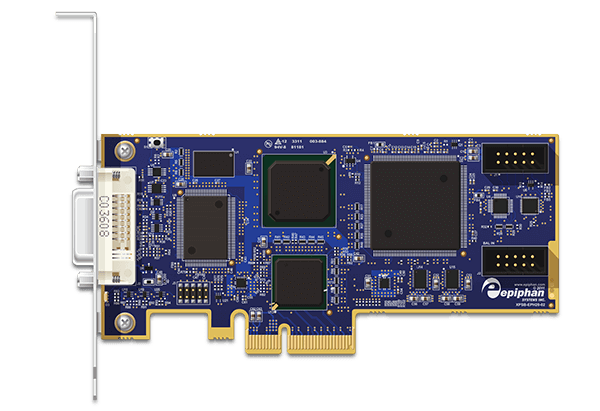
DVI2PCIe fits into a ×4, ×8 or ×16 PCIe 1.x slot and incorporates the same capture technologies and common software as the acclaimed VGA2USB Pro and VGA2Ethernet external frame grabbers. Furthermore, 128MB of on-board buffer RAM ensures not a single frame is skipped. For those applications that require a smaller PCIe ×1 form factor, with slightly less performance, please contact us for special orders of DVI2PCIe in an ×1 form factor.

DVI2PCIe Form Factor


DVI2PCIe

DVI2PCIe Optional A/V Kit - Early Access Program

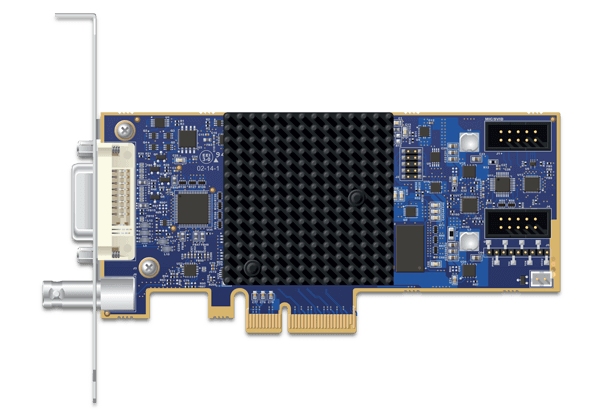
The DVI2PCIe A/V kit adds even more functionality to the DVI2PCIe. It consists of two add-on boards that allow the user to add S-Video, 3.5mm stereo or balanced ¼ inch TRS line-in inputs to their existing DVI2PCIe cards. This option is available to Early Access Program Participants

DVI2PCIe AV Kit

Click here to learn more about the DVI2PCIe A/V Kit.

DVI2PCIe - Epiphan Software Tools and 3rd Party Applications, Interfaces, SDK

Epiphan customers can download free Epiphan Software and Device Drivers for Windows, OSX and Linux (Download Software). Epiphan software is designed for 7×24 industrial robustness, including support for multiple DVI2PCIe cards installed on the same host computer.

The DVI2PCIe capture card driver is fully compatible with DirectShow in Windows, Video4Linux in Linux, and QuickTime in Mac OS X, meaning that it can be used in conjunction with any third party software that allows the use of an external camera as a video input. Alternatively, the DVI2PCIe software, available as a free download, supports not only the viewing and saving of the DVI/HDMI/VGA/ signal as an image or video, but also allows the user to:

An SDK, API, and examples are available free of charge for those users wishing to integrate the DVI2PCIe capture card into their custom applications.

Third Party Application Support

Epiphan Frame Grabbers are designed to work with open interfaces such as DirectShow, QuickTime and Video for Linux.

DirectShow Applications (click to expand)

Epiphan frame grabbers are specifically designed and tested to work with Microsoft DirectShow compatible applications.

The following is a list of applications that Epiphan believes are compatible. Please note that this is not a comprehensive list of compatible applications, but a list of applications that are believed to be in use by other Epiphan customers. Refer to the specific application documentation for details on how each application supports Direct Show:

• GraphEdit (part of the Microsoft DirectShow SDK)

Microsoft Media Encoder (Expression Encoder)

VirtualDUB

VLC

Adobe Flash Media Encoder

Skype

How to Capture and Record Video Feed from the VGA or DVI sources using DirectShow Applications

QuickTime Applications (click to expand)

Epiphan frame grabbers are specifically designed and tested to work with QuickTime compatible applications.

The following is a list of applications that Epiphan believes are compatible. Please note that this is not a comprehensive list of compatible applications, but a list of applications that are believed to be in use by other Epiphan customers. Refer to the specific application documentation for details on how each application supports QuickTime:

QuickTime Pro

QuickTime Broadcaster

HackTV

WhackedTV

Wirecast

Podcast Producer

Skype

How to Record VGA or DVI signal using QuickTime Player

Video For Linux Applications (click to expand)

Epiphan frame grabbers are specifically designed and tested to work with Video For Linux compatible applications.

The following is a list of applications that Epiphan believes are compatible. Please note that this is not a comprehensive list of compatible applications, but a list of applications that are believed to be in use by other Epiphan customers. Refer to the specific application documentation for details on how each application supports Video For Linux:

VLC Player

Mplayer

GStreamer

How to Install Frame Grabber Drivers on a Workstation Running Linux and View the Grabbed Video

More Information

Documentation DVI2PCIe Product Documentation
Downloads Download drivers and software
FAQ Look through the most asked questions about the DVI2PCIe.
Specifications Technical specifications and performance parameters
SDK For tighter integration of Epiphan hardware, application developers can leverage Epiphan's Software Development Kit.
Buy Now Buy the DVI2PCIe now

Related Products and Alternatives

A selection of guides to selecting VGA or DVI/HDMI frame grabbers and broadcasters for your applications.

VGA Frame Grabbers Selection Guide
VGA Frame Grabber Selection Guide
DVI/HDMI Frame Grabbers Selection Guide
DVI/HDMI Frame Grabber Selection Guide
DVI/HDMI Broadcasters Selection Guide
VGA/DVI Broadcaster/Streamer Selection Guide

VGA2Ethernet
  • Captures from DVI, HDMI or VGA up to 1920×1200
  • Output progressive up to 60 FPS
  • 5-30 FPS @1920×1080
  • Pre-compression hardware for lossless capture
  • Win, Mac, Linux
  • DirectShow, QuickTime APIs
VGA2Ethernet
DVI2USB 3.0
  • Fastest USB frame grabber available from Epiphan
  • Captures from DVI, HDMI, or VGA
  • Supports USB 3.0 or USB 2.0
  • Resolutions up to 1920x1200 at 30 frames per second minimum
  • Win, Mac, Linux
  • DirectShow, QuickTime, V4L APIs
DVI2USB 3.0
VGA Splitter Ground Loop Isolator
  • Ground loop isolator with High Quality active VGA splitter
  • Connects existing VGA, amplifies the signal, generates a clean isolated VGA output
  • Output Ground Loop Isolated port and fault-tolerant pass through port
  • 1GHz Signal Bandwidth
VGA Splitter Ground Loop Isolator

1 PCIe x1 available as a custom order, performance will differ since bus bandwidth using ×1 form factor will be lower. Please contact Epiphan or an Epiphan channel partner for special orders.