Products
DiscontinuedBuy Online
Price: $ 1,600
Buy Nowplus shipping and excluding local duties and taxes (VAT), if applicable
Please review our Shipping and Return policies.
Case studies
Other solutions

VGADVI Broadcaster
Product Overview
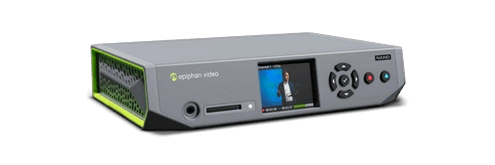
Epiphan VGADVI Broadcaster™ is a stand-alone appliance for streaming and/or recording video display and camera sources.

VGADVI Broadcaster captures an HD video source such as a computer monitor, RADAR display or ultrasound monitor as well as an SD video source such as a camera feed. VGADVI Broadcaster then streams these inputs as two synchronized time-stamped streams or one picture-in-picture stream. The streams can be viewed remotely in a multitude of ways, including through web browsers, media players, or mobile devices. A recording of the streams can also be made.
VGADVI Broadcaster is easy to setup and use, and works straight out of the box. It does not require the use of a computer or any additional equipment - simply power it on to start recording.
HD + SD Video Audio Capture
VGADVI Broadcaster captures an HD video source (up to 1920x1200) channel from a VGA/DVI/HDMI1 display or camera, in parallel with an analog S-Video/Composite (PAL, NTSC) SD video source channel and a stereo/mono audio source.

Encode
VGADVI Broadcaster encodes the input channels into a choice of standard formats:

StreamVGADVI Broadcaster streams the input channels as a single stream or two independent streams up to 30 FPS. Standard browsers and media players view the stream(s) via a URL over choice of: HTTP, RTP over RTSP, UDP, HTTP Administrators can custom brand the output stream layout, picture with picture arrangement, time stamping, copyright, and other branding. |
![]() |
Record to Publish and ReplayVGADVI Broadcaster records the input channel streams to its 8GB internal storage, network storage, internal FTP server, external FTP site and/or local USB storage key. Media files can be viewed by standard media players, browsers and processed with standard multi media editing tools. |
![]() |
Viewing VGADVI Broadcaster Streams
![]() |
Web Browser |
![]() |
Media Player |
![]() |
Mobile Device |
Extended CDN/Publish to Web Compatibility

CDNs, or Content Delivery Networks, are scalable services that allow the user to quickly and easily distribute content over the web to a wide variety of devices and in different formats. VGADVI Broadcaster provides multiple ways to share captured video with the world and has out-of-the-box support for CDN services such as StreamZilla and StreamGuys.
Epiphan Systems also provides its own free-of-charge CDN service - Epiphan.TV, on a trial basis to each VGADVI Broadcaster user.
VGADVI Broadcaster File Storage Features
![]() |
Automated Network Storage VGADVI Broadcaster can be configured to automatically copy recordings to a network storage location using a choice of FTP, CIFS or RSYNC. This feature facilitates integration with content management and publication systems. |
![]() |
Automatic Local USB Storage Key Copy VGADVI Broadcaster will automatically copy the most recent recordings to a USB Storage Key. This is a great feature if you want to instantly provide a copy of the presentation to the presenter without requiring network connectivity. |
![]() |
Built in FTP server VGADVI Broadcaster has a built in FTP server for integration with content management systems that simply need to connect via FTP to ingest the recorded content |
VGADVI Broadcaster Form Factor and Connectors
VGADVI Broadcaster is a compact portable desktop recording solution that is 7.95"x4.13"x1.38" (202x105x35mm) in size. The buttons and connector interfaces are shown below.

Stream as 1 Channel or Independent Channels
| Multi-Source Picture with Picture Video Matrix / Multiplexing Features VGADVI Broadcaster can be configured to synchronize and record video sources as a single video channel or maintain the two video sources as a multi-track video channel. |
![]() |
VGADVI Broadcaster Control and Configuration
VGADVI Broadcaster provides a number of external and internal methods to start and stop recording as listed below

File Management Dashboard
VGADVI Broadcaster has a web-based file manager to view recorded files as shown below. Each file has a name and start time, end time and duration fields. Files are grouped by date and segmented by contiguous recording timelines. You can change file names, upload one, multiple or all files, delete one, multiple of all files.

More Information
| Specifications | Technical specifications and performance parameters |
| FAQ | Look through the most asked questions about VGADVI Broadcaster. |
| Documentation | VGADVI Broadcaster Product Documentation |
Related Products and Alternatives
A selection of guides to selecting VGA or DVI/HDMI frame grabbers and broadcasters for your applications.
![]() VGA Frame Grabber Selection Guide |
![]() DVI/HDMI Frame Grabber Selection Guide |
VGA/DVI Broadcaster/Streamer Selection Guide |
VGA Broadcaster Pro
| ![]() |
VGADVI Recorder Pro
| ![]() |
VGA Splitter Ground Loop Isolator
| ![]() |
1HDMI support limited to non copy protected content, and does not include digital audio source, but can record analog audio source