Products

Dev. Kit
Dev. Kit Pro
DaVinci Dev Kit
Discontinued

Buy Online

Price: $ 999.95

Buy Now

plus shipping and ex­cluding local duties and taxes (VAT), if applicable
Please review our Shipping and Return policies.

FedEx

In Stock. Same day shipping before 2PM EST

Case studies

Healthcare:
DVI Signal Capturing In Computer Tomography and Magnetic Resonance Imaging Equipment
IT / Computing:
Simplify Development and Speed Time-to-Market with Epiphan Products
Other:
Recording Stats on Winning Slots
Security:
Estimating Oil Spills with Epiphan's DVI2USB
Education:
Use DVI2USB to Capture and Record Lectures and Seminars

 Other solutions

download brochure


Bookmark and Share
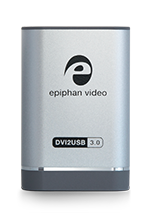
DVI2USB image

DVI2USB

Product Overview

Epiphan DVI2USB™ is the only external, dual-mode (VGA & DVI/HDMI1) digital video capture device that can capture and broadcast diagnostic-quality images and videos from a VGA, DVI, HDMI video source and transfer to a USB port on another computer. No peripheral component interface (PCI) is required. This product is designed specifically for applications that require the support of a DVI/VGA/HDMI input.

DVI2USB  Connection Diagram

View the DVI2USB Video Presentation

DVI2USB Key Features

DVI2USB uses the ubiquitous and inexpensive USB port to capture output from virtually any VGA or DVI or HDMI source source—such as a Windows PC, a Macintosh OSX, a Unix machine, an embedded system, a medical device, scientific or lab equipment, and more. Using Epiphan or 3rd party applications, can then broadcasts these images over public, private or broadband wireless networks, enabling remote diagnosis of medical, military, and other situations in which a precise image is required for accurate decision-making.

This digital video capture device provides a simple, lightweight and rapid means of conveying mission-critical VGA, DVI and HDMI images without degradation due to traditional methods of compression. DVI2USB also enables users to:

DVI2USB Form Factor and Connectors

DVI2USB

As a compact external device, DVI2USB is easy to use and to transport. About the size of a small paperback book, it is easily plugged in making it simple to set-up for any individual with basic knowledge of computers.

The product ships complete with all required hardware and connectivity and a power supply. Software development kits are also available for specialized applications.

VGA Capture

In order for the DVI2USB to capture a VGA video source signal, the VGA-to-DVI adapter must be connected to the DVI port of the DVI2USB (included with DVI2USB).

DVI Capture

DVI2USB is capable of capturing any single-link DVI signal (up to 1920x1200). If you require dual-link DVI capture or support for resolutions above 1920x1200, you need DVI2USB DUO.

HDMI Capture

HDMI capture is possible using a HDMI to DVI adapter (purchased separately). The audio stream will not be captured during HDMI capture. Furthermore, HDCP or copy-protected content cannot be captured using DVI2USB.

Display Port and Mini Display Port Capture

Mac users can use an adapter to capture DVI from mini display port, display port and thunderbolt interfaces.

DVI2USB Product Demonstration Video

Watch the following demonstration video of how DVI2USB is used to capture a VGA display, a DVI display and an HDMI display. The first demo captures a VGA source, the second captures a display port with DVI adapter, the third captures an iPad screen using an HDMI to DVI adapter.

Sample Application : DVI2USB and Podcast Producer from Apple

Epiphan DVI2USB can be used as an external capture tool to acquire VGA , DVI or HDMI display sources, presentations and ingest them into the Podcast Producer Capture product from Apple.

DVI2USB and Podcast Producer from Apple

Simply connect DVI2USB to your video source and run the Podcast Producer Capture tool to start ingesting the display source. Display sources can be VGA, DVI, HDMI displays such as computers, iPads, laptops, ultra sound machines, cameras and any embedded systems that has a DVI or HDMI display output. This is a great solution for creating lectures, training and demonstration videos without the need to install software on the video source.

DVI2USB Software Tools and 3rd Party Applications, Interfaces, SDK

Epiphan Software Capture Tool

Epiphan DVI2USB comes with a free Epiphan software capture tool that allows Epiphan customers to quickly capture and record video and images. The Epiphan Capture tool also has open interfaces to add standard and custom CODECs. View Epiphan Software Capture Tool Overview Video.

Third Party Application Support

Epiphan Frame Grabbers are designed to work with open interfaces such as DirectShow, QuickTime and Video for Linux.

DirectShow Applications (click to expand)

Epiphan frame grabbers are specifically designed and tested to work with Microsoft DirectShow compatible applications.

The following is a list of applications that Epiphan believes are compatible. Please note that this is not a comprehensive list of compatible applications, but a list of applications that are believed to be in use by other Epiphan customers. Refer to the specific application documentation for details on how each application supports Direct Show:

• GraphEdit (part of the Microsoft DirectShow SDK)

Microsoft Media Encoder (Expression Encoder)

VirtualDUB

VLC

Adobe Flash Media Encoder

Skype

How to Capture and Record Video Feed from the VGA or DVI sources using DirectShow Applications

QuickTime Applications (click to expand)

Epiphan frame grabbers are specifically designed and tested to work with QuickTime compatible applications.

The following is a list of applications that Epiphan believes are compatible. Please note that this is not a comprehensive list of compatible applications, but a list of applications that are believed to be in use by other Epiphan customers. Refer to the specific application documentation for details on how each application supports QuickTime:

QuickTime Pro

QuickTime Broadcaster

HackTV

WhackedTV

Wirecast

Podcast Producer

Skype

How to Record VGA or DVI signal using QuickTime Player

Video For Linux Applications (click to expand)

Epiphan frame grabbers are specifically designed and tested to work with Video For Linux compatible applications.

The following is a list of applications that Epiphan believes are compatible. Please note that this is not a comprehensive list of compatible applications, but a list of applications that are believed to be in use by other Epiphan customers. Refer to the specific application documentation for details on how each application supports Video For Linux:

VLC Player

Mplayer

GStreamer

How to Install Frame Grabber Drivers on a Workstation Running Linux and View the Grabbed Video

APIs and Software Development Kit

For tighter integration of Epiphan hardware, application developers can leverage Epiphan's Software Development Kit. SDK Downloads.

Related Products and Alternatives

A selection of guides to selecting VGA or DVI/HDMI frame grabbers and broadcasters for your applications.

VGA Frame Grabbers Selection Guide
VGA Frame Grabber Selection Guide
DVI/HDMI Frame Grabbers Selection Guide
DVI/HDMI Frame Grabber Selection Guide
DVI/HDMI Broadcasters Selection Guide
VGA/DVI Broadcaster/Streamer Selection Guide

DVI2USB-RM - Rack mount version of DVI2USB frame grabber • Configurable with 2 DVI2USB units in a size 1U rack • Ideal solution for capturing DVI output from ser­vers, medical devices, and other "headless" machines. DVI2USB Rack Mount
VGA Broadcaster Lite - An appliance that captures VGA, DVI/HDMI video and audio signals, encodes on-the-fly to standard protocols such as H.264, MPEG 4, MJPEG and streams over the Internet via HTTP using standard browsers and viewers. VGA Broadcaster Lite is ideal for WAN and LAN applications as an alternative approach to streaming uncompressed display signals over Ethernet networks. VGA Broadcaster Lite
VGA Recorder Lite - An appliance that captures VGA, DVI/HDMI video and audio signals, encodes on the fly to standard protocols such as H.264, MPEG 4, MJPEG and records the output to local storage, accessible via http with built in webserver, FTP, and automatic copy features. Compressing and encoding the on the fly saves time in pre-production of videos. VGA Recorder Lite

More Information

Case Studies - See how Epiphan Systems DVI2USB is used for video and image capture by users all over the world.

FAQ - Look through the most asked questions about the DVI2USB.

1Requires HDMI to DVI adapter cable. HDMI support limited to non copy protected content, and does not include digital audio source