Using the Remote Control
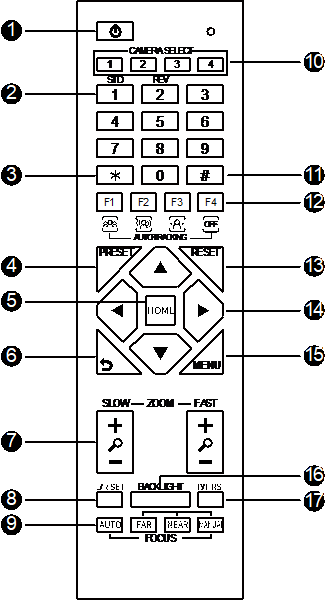
You can control a number of different features using the included remote control. See below for a diagram outlining what each button does.
|
|
Shortcut Set: Press these key combinations to apply certain settings quickly. Press the keys one at a time in the sequence below.
[#] + [*] + [F4]: Enable or disable the Image Freeze
[*] + [#] + [1]: OSD menu language to English
[*] + [#] + [3]: OSD menu language to Chinese
[*] + [#] + [4]: Display current IP address
[*] + [#] + [6]: Quickly recover the default (Factory reset?)
[*] + [#] + [8]: Check the camera version
[*] + [#] + [9]: Enable vertical image flip
[*] + [#] + [MANUAL]: Restore to default IP address